
Using Moodle
This guide's is designed show you how to get around Moodle. Think of it like your personal cheat sheet for finding stuff and getting things done in your online classes.
Finding What You Need:
At the top of the page, you'll find ways to browse:
- Alphabetical: (A, B, C...): Click a letter to jump to terms starting with that letter.
- All: See every single term on one long page.
- Search Bar: This is your best friend! Just type in what you're looking for (like "Grades" or "Assignments") and hit Enter.
- Key Words: Every entry has a bolded word (like "MyCourses" or "Messages") and a clear explanation of what it is and what it does in Moodle.
- Helpful Links: You'll often see blue, underlined words inside the definitions. These are links to other terms in the glossary. Click 'em! It's a great way to see how different parts of Moodle connect.
Quick Tips for Making It Easier:
- Use that search bar! It's the fastest way to get answers.
Put it into practice. The more you actually do what the glossary says, the better you'll understand Moodle.
Come back to it. Moodle has a lot going on. If you ever forget how something works, just come back here to review
A | B | C | D | E | F | G | H | I | J | K | L | M | N | O | P | Q | R | S | T | U | V | W | X | Y | Z | ALL
I
Incomplete - You Received an Incomplete - Now What? | |||||||
|---|---|---|---|---|---|---|---|
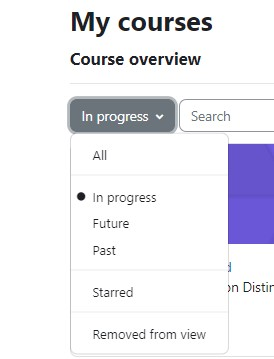
If you have received an Incomplete for a course, you will be able to continue to access the course in Moodle until the grade is changed. To find the course, follow the steps below.
| |||||||

Background Colour
Font Face
Font Kerning
Font Size
Image Visibility
Letter Spacing
Line Height
Link Highlight
Text Colour