Matt Litchford

Grades - Viewing Your Course Grades

by Matt Litchford - Wednesday, June 25, 2025, 8:41 AM
 

This tutorial shows you how to view your grades for a course.

Viewing Your Course Grades
Step 1

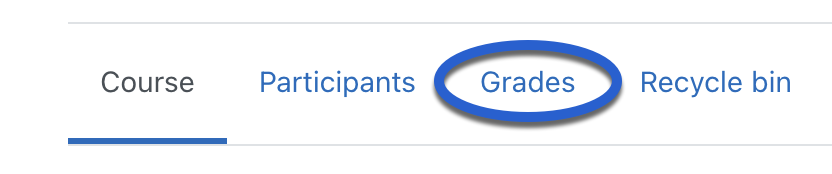
On the main page of the course, click Grades.

Image of Grades highlighted in blue

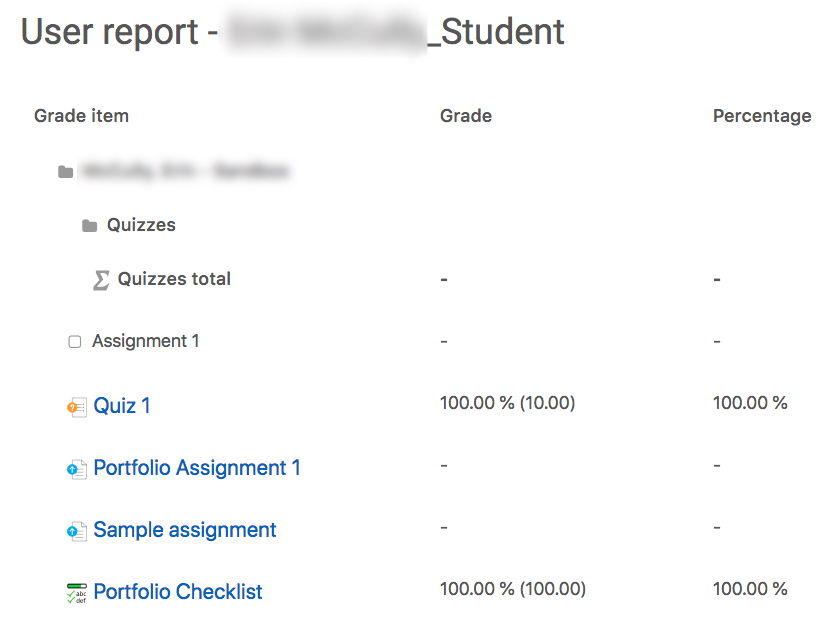
Step 2 Here you can view the grade and the point value of your assignments.

Image of a sample user report


Questions? Please submit a Help Ticket to SCC E-Learning (under "Select Type of Help," choose "Moodle Assistance")

» Using Moodle

Accessibility

Background Colour Background Colour

Font Face Font Face

Font Kerning Font Kerning

Font Size Font Size

1

Image Visibility Image Visibility

Letter Spacing Letter Spacing

0

Line Height Line Height

1.2

Link Highlight Link Highlight

Text Colour Text Colour