

Sending Messages to Students via Moodle

Instructors can send a group message to students via the Moodle messaging system. Messages will generate a notification in Moodle and an email that will go to students' SCC email accounts.

Most of the time, putting in an announcement should be sufficient for communicating with your class; however, if you wish to message only specific groups of students, sending a message may be your preferred method. Be aware that you will not receive a copy of the message, so if you prefer to have a copy, you will want to email students from your SCC email instead.

Step 1 Click on the Participants list at the top of your Moodle Course. image.png
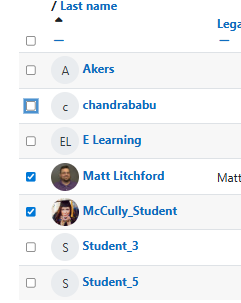
Step 2 Click the checkbox next to the users that you want to message.  image%20%281%29.png
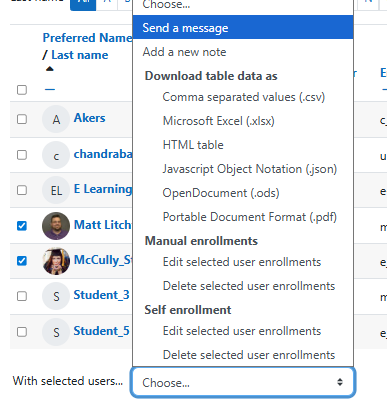
Step 3 Then, use the drop-down menu near the bottom of the page next to With selected users... to choose Send a message.   image%20%282%29.png
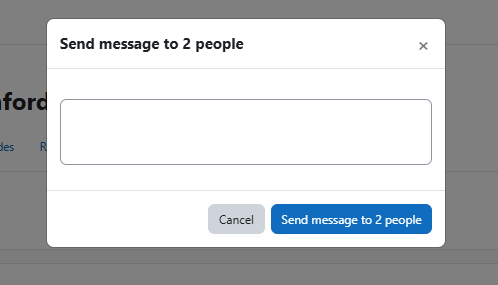
Step 4 In the resulting pop-up, type your message and click Send message to... people. image%20%283%29.png


Questions? Please submit a Help Ticket to SCC E-Learning (under "Select Type of Help," choose "Moodle Assistance")

» Moodle Help

Accessibility

Background Colour Background Colour

Font Face Font Face

Font Kerning Font Kerning

Font Size Font Size

1

Image Visibility Image Visibility

Letter Spacing Letter Spacing

0

Line Height Line Height

1.2

Link Highlight Link Highlight

Text Colour Text Colour